Store your ideas
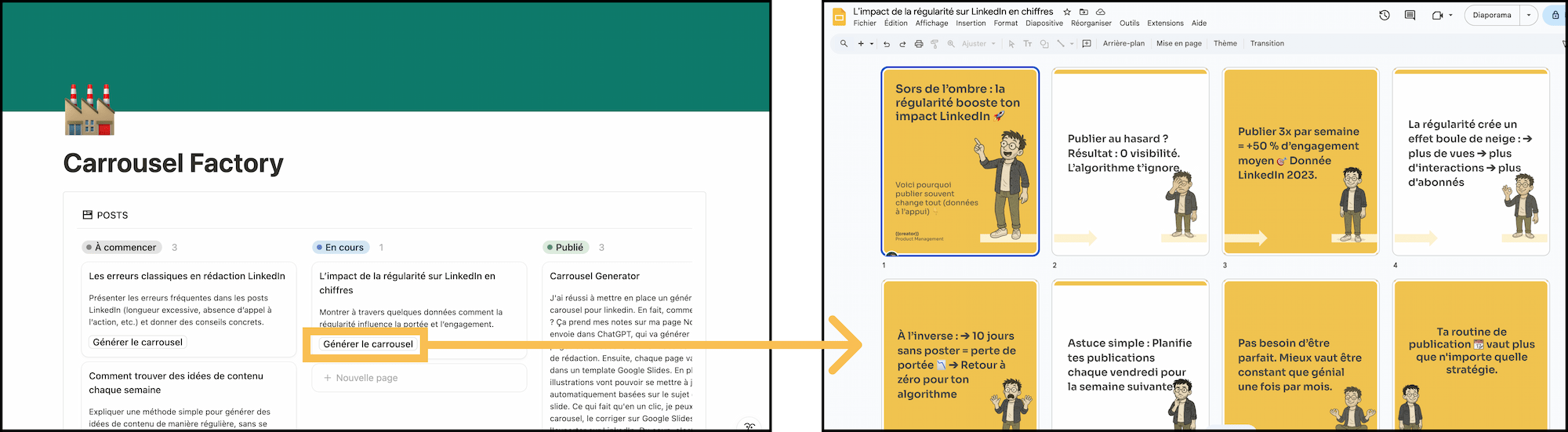
Drop them into a free Notion space (included in the pack).
From a raw idea to a polished, on-brand carousel in seconds — AI does the writing, the illustrations and the design. You just publish.
“As an overloaded freelancer, it’s the perfect tool to produce attractive content fast. A massive time-saver.”
Drop them into a free Notion space (included in the pack).
AI writes the content from your idea, picks the right illustrations and applies a customizable design template.
Final tweaks in Google Slides, export to PDF, and post. ✨
You have plenty of post ideas, but you lack the time to write them all, you’re not sure how to structure the message, and you want a pro result without spending hours on Canva. Carrousel Factory fixes that.
I don't sell this one anymore — it's here to show the kind of thing I build. Want something similar? Let's talk.
No! The free version is enough.
No! The free version is enough.
No — but you’ll need an OpenAI API key to run the automation, plus a few euros of OpenAI credit to get started.
No. Carrousel Factory is for everyone, including people who have never used Make. The automation is included in the pack — you just import it into Make to get it running (under 1 min).
You add your own catalogue of PNG illustrations to a Google Drive folder, and the AI picks the best image from it based on the file name — e.g. funny.png when the text is funny. The tutorial explains everything, including how to build your own avatar catalogue.
It’s all explained in the tutorial!
No. Carousels are generated in Google Slides, and that’s where you can fine-tune them.
Absolutely — you just need to tweak the prompt a tiny bit (under 1 min).
Unfortunately no, because it’s a downloadable pack. Once you have access to it on your computer, it becomes yours — I no longer have any control over it and can’t revoke access after a refund. This differs from a classic SaaS service.
Yes. I keep improving the content (Make automation, Google Slides template, prompts) based on user feedback. Every major update is announced by email.
No. All minor and major updates are included for life for existing customers.
Free: I answer your questions by email. Paid: I set everything up for you.
You may not resell or redistribute the Make blueprint, the Google Slides template or the prompts.
Product Manager in a tech start-up, absolute fan of Notion and of systems that set creativity free. My goal: help as many experts as possible share their knowledge without the hassle. ♥️
From idea to carousel in seconds. Post more, stress less.
Let's talk →